
Now Reading: Trimmer Potentiometer with ESP8266 (Step-by-Step Guide)
-
01
Trimmer Potentiometer with ESP8266 (Step-by-Step Guide)


Introduction
A potentiometer is a variable resistor that allows you to adjust resistance manually. A trimmer potentiometer (or trimpot) is a small, adjustable version usually used on PCBs for fine-tuning voltage, brightness, contrast, or calibration in circuits.
When we connect a trimmer potentiometer with the ESP8266, we can use it as an analog input device. For example, we can read the resistance value and use it to:
- Control the brightness of an LED
- Adjust motor speed
- Set thresholds in sensor projects
- Tune IoT devices dynamically
Since the ESP8266 has only one ADC pin (A0), we will connect the potentiometer to it and read values ranging from 0 to 1023.
Components Required
- ESP8266 (NodeMCU / Wemos D1 Mini)
- Trimmer Potentiometer (e.g., 10kΩ)
- Breadboard
- Jumper Wires
- USB Cable
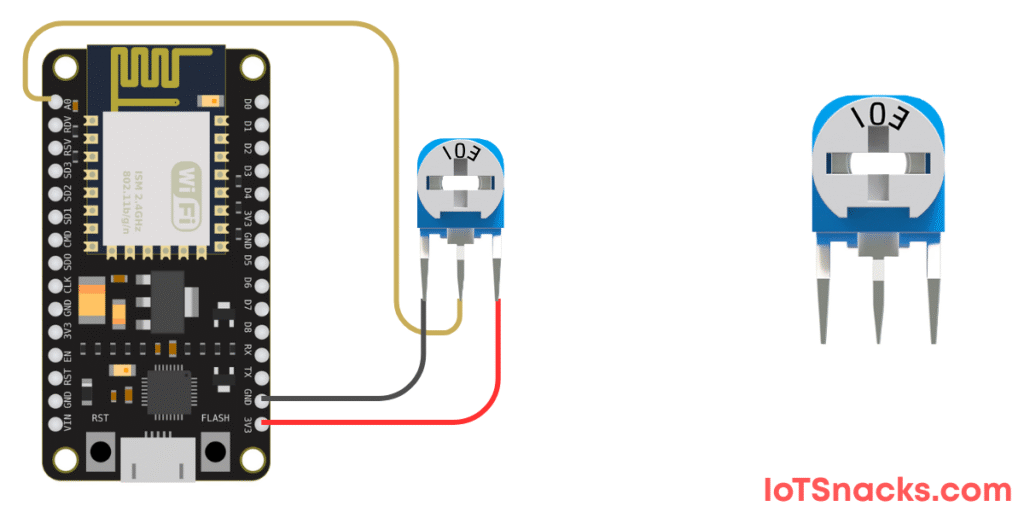
Circuit Diagram (Potentiometer → ESP8266)
- Middle pin (wiper) → A0
- One side pin → 3.3V
- Other side pin → GND
⚠️ Note: ESP8266 ADC works on 0–3.3V only, so don’t supply 5V to the potentiometer.
Arduino Code for Trimmer Potentiometer with ESP8266
// Trimmer Potentiometer with ESP8266
int potPin = A0;   // Potentiometer connected to analog pin A0
int potValue = 0;  // Variable to store potentiometer value

void setup() {
  Serial.begin(115200); // Start Serial Monitor
}

void loop() {
  // Read potentiometer value (0 to 1023)
  potValue = analogRead(potPin);

  // Print value to Serial Monitor
  Serial.print("Potentiometer Value: ");
  Serial.println(potValue);

  delay(500); // Wait 0.5 seconds
}
Step-by-Step Code Explanation
Pin Declaration
int potPin = A0;Setup Function
Serial.begin(115200);Loop Function
potValue = analogRead(potPin);
Serial.println(potValue);
analogRead(A0) reads values between 0 and 1023 depending on the position of the potentiometer.
The value is printed on the Serial Monitor.
Output
- When the potentiometer knob is turned fully towards GND → Value ~0.
- When turned fully towards 3.3V → Value ~1023.
- Intermediate positions give values between 0 and 1023.
Real-Life Applications
- Brightness Control
- Use the potentiometer value to control LED brightness with PWM.
- Volume Control
- Potentiometers are used in amplifiers and radios as volume knobs.
- Sensor Calibration
- Set threshold levels for gas sensors, temperature cutoffs, etc.
- Motor Speed Control
- Adjust DC motor speed in automation projects.
- IoT Applications
- Use the potentiometer as a manual input device for IoT dashboards.
Troubleshooting
- Getting only 0 or 1023 values:
- Check wiring of the 3.3V, GND, and wiper pin.
- Make sure the potentiometer range is within ESP8266 ADC voltage (0–3.3V).
- Values fluctuate too much:
- Use a stable breadboard connection.
- Add a small capacitor (~0.1µF) across the potentiometer to reduce noise.
- ESP8266 not reading analog values properly:
- Some ESP8266 boards (like NodeMCU) have an onboard voltage divider on A0, so ensure your potentiometer output does not exceed 3.3V.
Can ESP8266 read potentiometer values directly?
Yes, ESP8266 can read potentiometer values through its A0 analog pin, which reads voltages from 0–3.3V.
What range of values does analogRead() return in ESP8266?
analogRead(A0) returns values between 0 and 1023, representing 0–3.3V input.
Can I use a normal potentiometer instead of a trimmer?
Yes, both work the same. A trimmer is small and used for calibration, while a normal potentiometer is larger and suitable for user control.
Can I use a 5V potentiometer with ESP8266?
Yes, but only if you ensure the output going to A0 pin never exceeds 3.3V. Otherwise, you may damage the ESP8266.
How can I use the potentiometer in IoT projects?
You can map potentiometer values to control LED brightness, fan speed, or send them to an IoT dashboard for real-time monitoring.